- Knowledge Base
- Specification Manager
- Creating Specification Templates
-
FAQs
-
Activation Process
-
One Pagers
-
Document Request Manager
-
Settings- Company Settings
-
Settings- Company Users Email & Security
-
Supply Chain Manager
-
Product Check Manager
-
Internal Document Manager
-
Production Models
-
Supplier Manager
-
Settings- Manage Products
-
Supplier Questionnaire Manager
-
Supplier Check Manager
-
Supplier Document Manager
- Tool Documentation
- Initial Setup of Supplier Document Manager
- Creating A Supplier Document Template
- Building The Document
- Approving The Document Internally Before Sending Out
- Delete Documents
- View Selected
- Sharing A Document With Suppliers To Sign Off
- Exceptions
- Sign Off Review
- Viewing A Customer Document
- Sign Off The Document
- Assign Responsibility
- Delete/Reject Selected
- Receiving & Viewing An Exception
-
Risk Assessment Manager
-
Incident Manager
- Tool Documentation
- Initial Setup
- Create Incident Forms – Supplier & Customer Confirmations
- Edit Incident Forms – Supplier & Customer Confirmations
- RASFF Notifications
- Create An Incident From The RASFF Notifications
- View Incident
- Edit Incident
- Share An Incident
- View Company Incident Shares
- View Responses From Supplier
- Request More Info
- Respond To Incident/Confirm/Close Out Incident
- Supplier Side Incident Manager
-
Remote Audit Manager
-
Specification Manager
- Tool Documentation
- Initial Setup For Specification Manager
- Creating Specification Templates
- Creating And Managing Company Specifications
- Creating and Managing Collaborative Specifications
- Creating and Managing Ingredient Specifications
- Sharing and Managing External Specifications
- Providing Customer Access To Linked Specifications
- Managing Specification Exceptions
- Viewing Specifications On The App
-
Customer Complaint Manager
-
Internal Check Manager
-
Workflow Manager
-
Stock Manager
-
Forecast Manager
-
Order Manager
-
Meeting Notes Manager
-
Customer Tool Guides
-
Traceability Manager
-
Supplier Audit Manager
- Tool Documentation
- Initial Setup
- Building A Custom Audit
- Using And Completing An Audit
- Update An Audit
- Request An Internal Review
- Mark Audit As Complete
- Notify Team Members
- Send PDF Report
- Export Full Audit Table To PDF
- Export Full Audit Table To Excel
- Recall Audit
- Reopen Audit
- Managing Activity Subscriptions
- Supplier Provided Audits
-
Purchasing & Sales Manager
-
Visit & Audit Schedule
-
Formbuilder
2.14 Adding Custom Views Into A Specification Template
Custom views for your specification can be created from the template setup. These allow users to create views of their specifications with different layouts and exclude fields/sections where applicable for certain views.
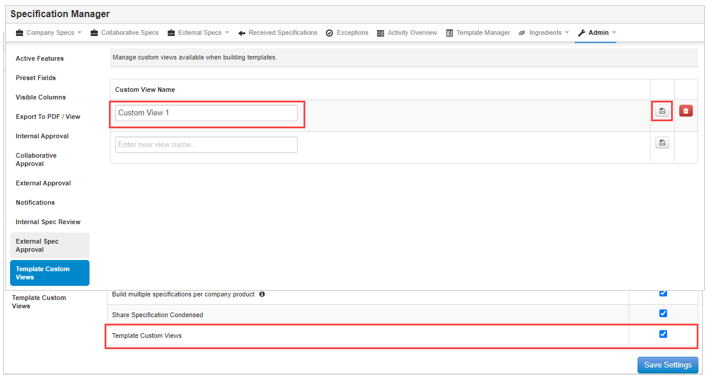
Step 1: Go to the Quality Management menu and select Specification Manager. Select the Admin tab and click on General Admin.

Step 2: In the Active Features section, tick the checkbox for Template Custom Views to activate this option. Click on Save Settings to save the change.
Step 3: A new tab will appear in the Admin page for Template Custom Views. Here you can add the names of your custom views by typing them into the textbox and clicking on the save icon to save them.
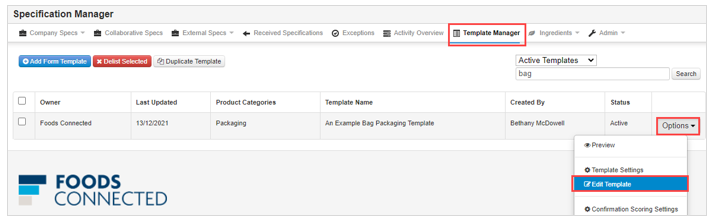
Step 4: Once you have added in your custom view name(s), you can create your custom views in the specification template setup. Go to the Template Manager tab, search for the specification template that you would like to create a custom view for, click on the Options menu beside the template and select Edit Template.
Step 5: Click on the Customise Views button at the top of the page.
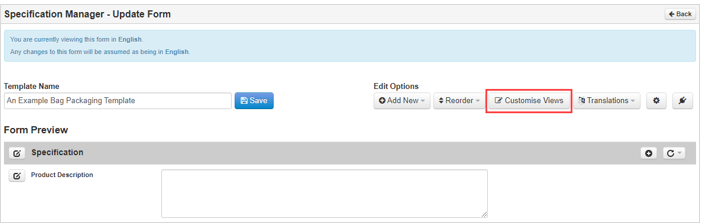
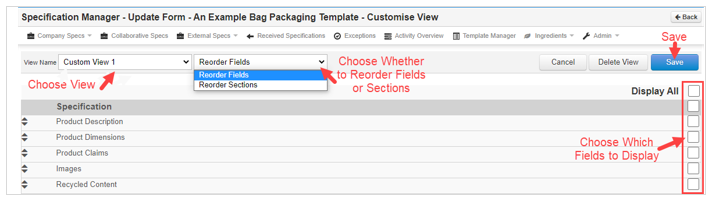
Step 6: Select the name of the view you would like to create/edit. You can choose to reorder fields/sections for your view as well as select which fields will display in the view. Once you have made your changes click on Save to save the setup. Follow the same steps if you have multiple vies to create. You can edit/delete custom views from this same page. *The setup selected will only apply to that view, it will not affect the initial setup of the template*
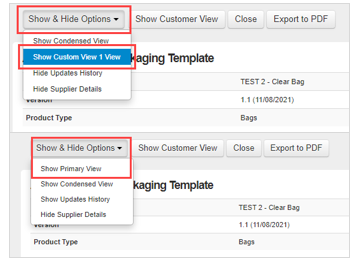
Step 7: When viewing one of your specifications that has been built using the template you added the custom views into, you will have the option to view the custom view. Click on Show & Hide Options and here you will see the option to view your custom view(s). You can then view/export this view as required.
Step 8: To revert back to the main view, click on Show & Hide Options and select Show Primary View.