![fc-logo.svg]](https://knowledgebase.foodsconnected.com/hubfs/fc-logo.svg)
A confirmation form is a form you can create to help you with verification and checking that the Internal Check has been fully & adequately completed. It is a list of questions you might ask yourself to check before confirmation. You can choose to use this or not.
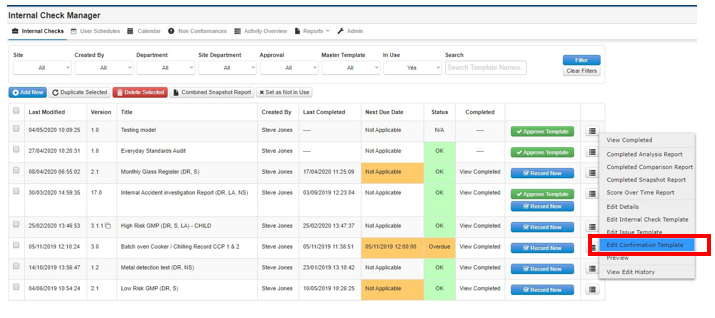
Step 1: Go to the Internal Check Manager select dropdown beside the questionnaire & select Edit Confirmation Template
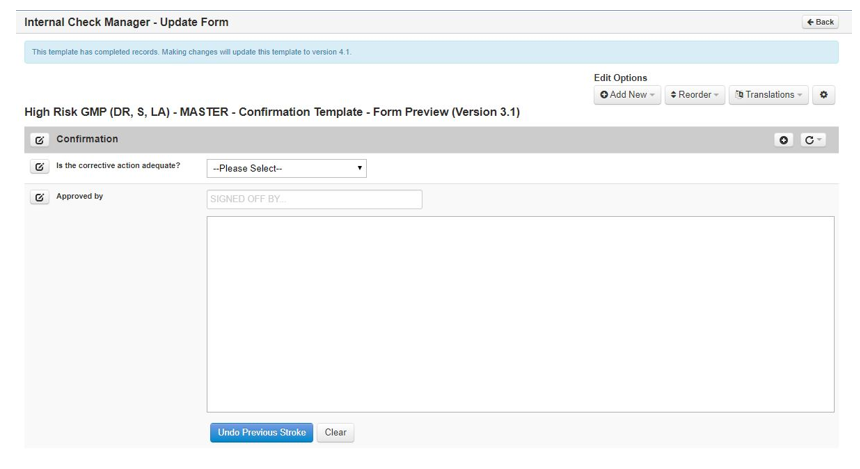
Step 2: From here you follow the same steps in Creating an Internal Check Template (Section 2.2) to create your Confirmation Template. It might end up looking like this