![fc-logo.svg]](https://knowledgebase.foodsconnected.com/hubfs/fc-logo.svg)
Step 1: Select Quality Management tab and select Specification Manager. Select the Admin tab, selecting General Admin.
Step 2: Select the Notifications section to set up email notifications for various actions taken on the system.
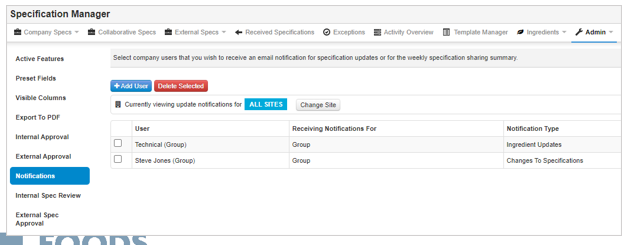
Select on Add User to add a new notification and this will open up a window with the options:
- User Site – select the user’s site to filter to the user dropdown.
- User – select the user who will receive the notification.
- Receive Notifications for – select the relevant site of the specifications that the notifications will be sent for
- Notification Type – select one of the options or all.
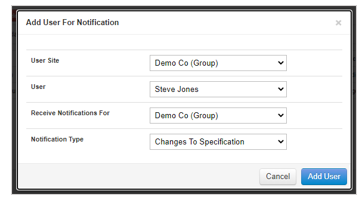
Step 3: To save click on Add User and these can be deleted by ticking the checkbox to the left of the notification and clicking on Delete Selected.