![fc-logo.svg]](https://knowledgebase.foodsconnected.com/hubfs/fc-logo.svg)
Create custom outcomes against the Risk Assessment template. Using colour coded Scoring Criteria helps to determine the Risk Assessment Outcome at a glance.
Step 1: Select Scoring Criteria
Step 2: Select Add Criteria

Step 3: To add scoring fill in the required field in the Add Scoring Criteria Tab. Select Add Criteria when details have been entered.
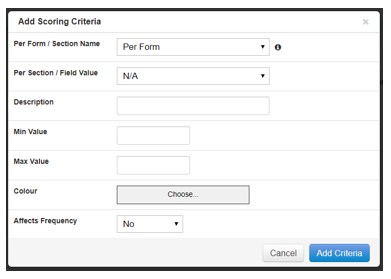
Per Form/Section – add scoring criteria per form and/or per section
Description - what each score boundary means e.g. pass/fail
Min Value/Max Value – Select the score boundaries
Colour – Select a colour for each score boundary
Affect Frequency – Update frequency based on score
Step 4: Once all scoring criteria has been added select Done