![fc-logo.svg]](https://knowledgebase.foodsconnected.com/hubfs/fc-logo.svg)
The form will determine the questions you want to ask for each step and how you want it answered using different field types

Step 1: Select edit & edit form on the right-hand side of the page. This will open a new window where you will build your form for that step to suit your needs

Step 2: Select ‘Add New Section’
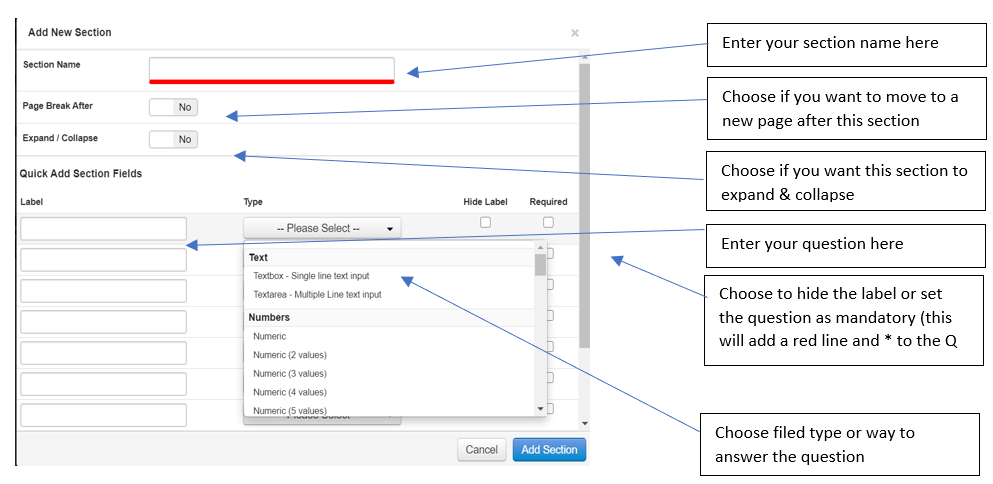
Add all step questions then select add section. The section will be displayed as per below:

There are various field types available, these are explained in the appendix section.
Step 3: To add more questions to a section select the plus icon and repeat the above steps

Step 4: When adding a second section additional options will be available

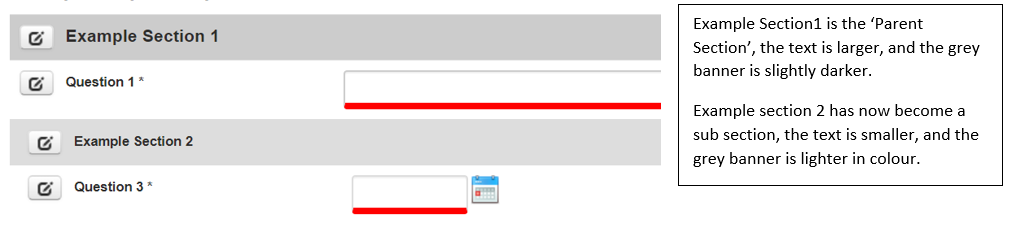
Notice how the second sub section is displayed below, it has been set up that Example section 1 is the parent section